
Campaigns Settings Integrations
Each of your Campaigns has its own Webhook to add to your other lead source applications. This configures them to push to each specific Campaign in Carrot CRM, and is automatically added to your Campaigns when you create them. When you are ready to set up your lead input accounts, come here to copy the webhook. This location is also where each Callrail or smrtPhone tracking number is added for your specific campaign.
Copy Webhooks or Add Callrail/smrtPhone Tracking Number
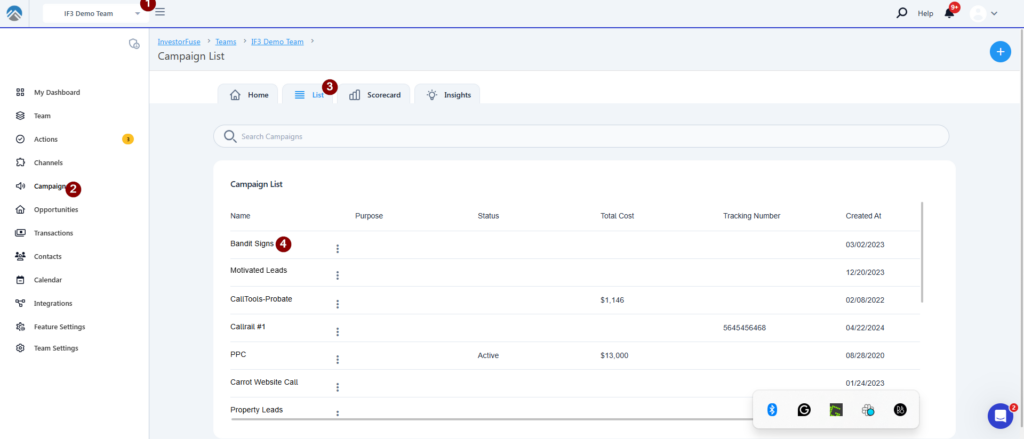
- Select the Team you’d like to view
- Click Campaigns which will route you to your Campaign List
- Click on the Campaigns List
- Click on the Campaign you wish to view
- Go to the Settings tab
- Click Integrations
- From here you can copy the Webhook to add to another application or add a Callrail/smrtPhone Tracking Number
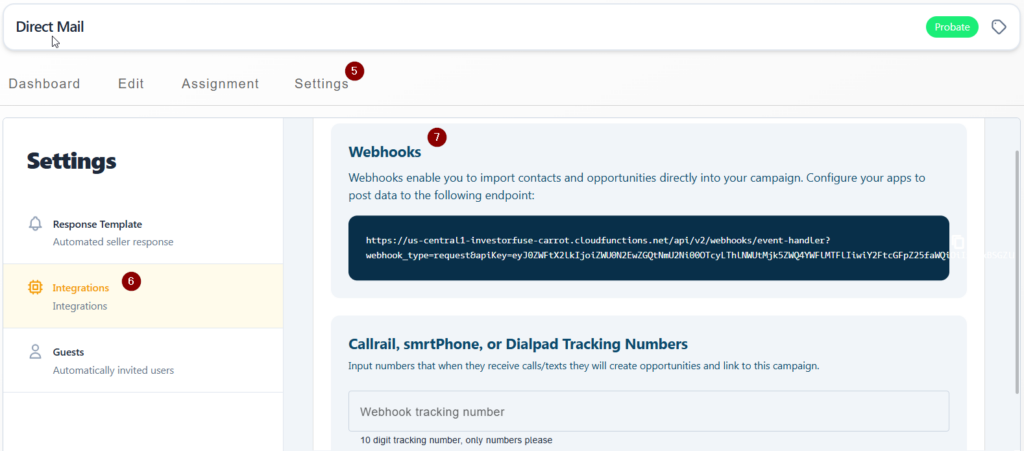
The tracking number will be auto-saved after you type it in so there are no additional steps.
Conclusion
With the campaign webhooks set up properly, you are able to accurately track each of your campaign’s leads and ensure that leads are associated to the correct campaigns when they enter your CRM. This can also help the team prioritize leads based on the source.
Was this article helpful?