
Click-to-Call
Carrot CRM does not have its own phone system. You can connect your dialing app to Carrot CRM using Chrome and Windows with a few simple steps.
Requirements:
- Google Chrome
- Microsoft Windows
- A phone calling/dialing app such as Dialpad, Skype, Ring Central, or other similar software installed on your computer
Process
- Once you have the above items installed, log in to Carrot CRM and open any Opportunity
- Click the phone number
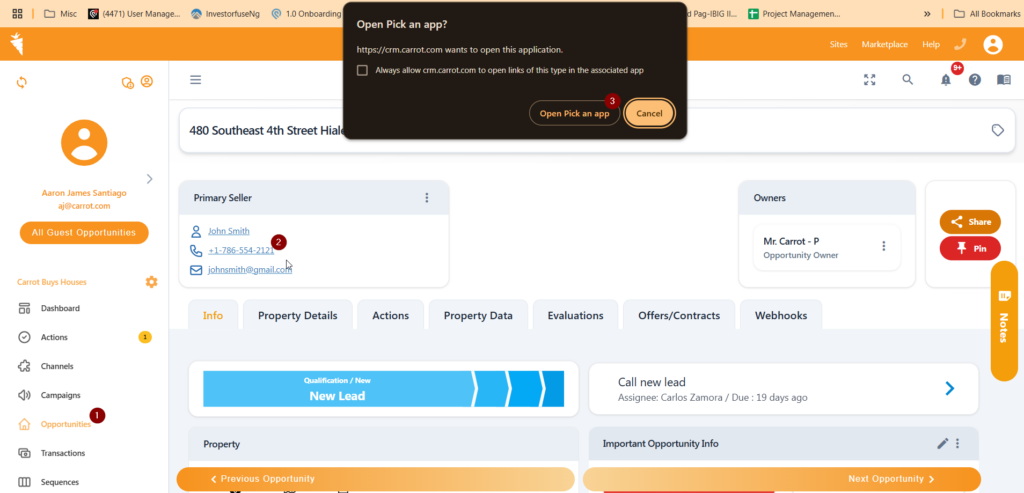
Chrome will return a message asking you where you want to make the call from. If you are logged into Google Chrome and your phone number is connected, you’ll have the option to select your phone.
- Click Pick an App to dial from your computer.
- Select the app you have installed to dial phone numbers from your computer.
- Click OK and Dialpad (or Skype, etc.) will open and dial the number.
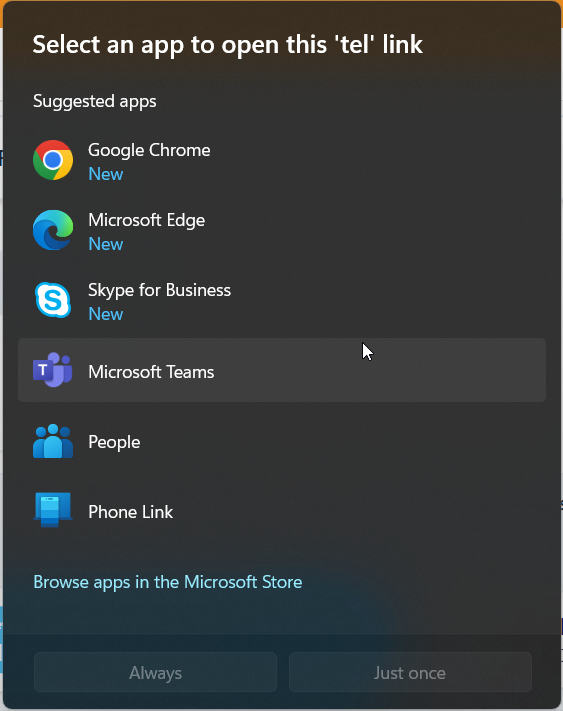
After this, you can click a seller’s phone number from Carrot CRM and start dialing using your preferred phone system.
Learn More:
If you have a smrtPhone account, download their click-to-call extension to set it up – https://help2.carrot.com/articles/integrations-smrtphone/
For DialPad, here’s a link to download it from their site – https://www.dialpad.com/download/
Was this article helpful?