
SmartTV Dashboard
The SmartTV Dashboard lets you display your team’s performance metrics on any TV or large screen. It cycles automatically between two live dashboards:
- Acquisitions Dashboard – tracks team outreach, calls, offers, and contracts.
- Company Dashboard – shows overall business performance (revenue, deal size, close ratio, etc.).
Every 30 seconds the dashboard automatically switches to the other view, and the data refreshes so you always see up-to-date stats.
🚨 Team Feature – Only available on the Team plan. To upgrade, choose your plan here.
To set up the SmartTV Dashboard
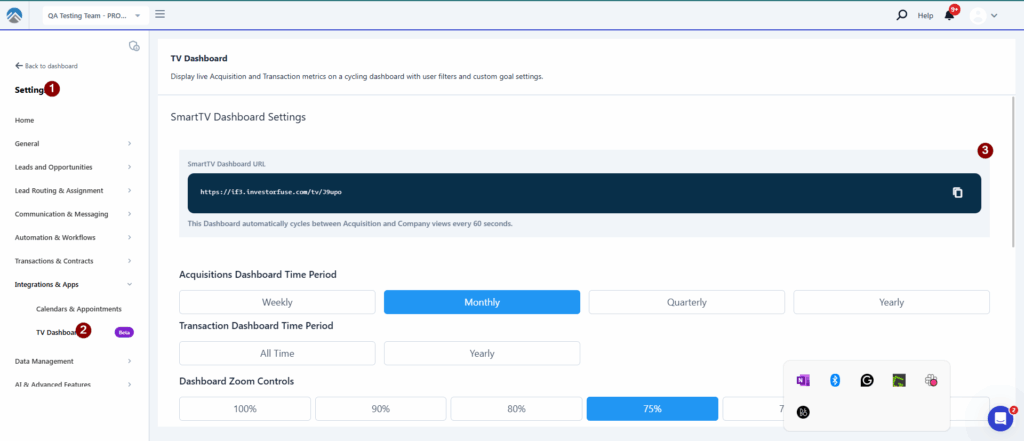
- Go to Settings → SmartTV Dashboard.
- Copy the TV Link shown there.
- On your SmartTV (or computer connected to a TV), open a browser and paste the link.
- Your dashboard will start cycling automatically.
Acquisition Dashboard
This view shows team activity and progress toward goals.
- Speed Dials (Top Boxes):
- Show how close you are to hitting your goals (calls made, offers, contracts, profit).
- The colors change as you make progress:
- 🔴 Red = far from goal
- 🟠 Orange = getting closer
- 🟡 Yellow = halfway there
- 🟢 Green = goal met or exceeded
- Individual Tiles:
- Show each team member’s projected profit from deals under contract.
- Table of Stats for Each Team Member:
- New Leads Assigned
- Gross to Net Lead % (healthy leads that aren’t marked dead)
- Calls Made 📞 (with color-graded goals)
- Texts Sent 💬
- Speed to Lead ⏱️ (how quickly you respond)
- Talk Time 📲
- Verbal Offers (with color-graded goals)
- Contracts Sent 📝
- Contracts Accepted ✅
- Leads to Contract Ratio 🎯 (how many leads it takes to close a deal)
Company Dashboard
This view shows your overall company performance.
- Top Stats:
- Total Revenue 💰
- Unassigned Revenue
- Assigned Revenue
- Close Ratio (%)
- Average Deal Size
- Number of Contracts
- Leads to Contract Ratio
- Transaction Table:
- Shows selected team members’ transaction data.
- Great for keeping track of closings and overall deal flow.
Manager Settings
Inside Team Settings → SmartTV Dashboard, managers can customize:
- Time Period: Weekly, Monthly, Quarterly, or Yearly
- Acquisition Dashboard Users & Goals:
- Profit Goal
- Calls Goal
- Verbal Offers Goal
- Leads to Contract Goal
- Company Dashboard Users:
- Pick who should appear in the Transaction Table
💡 Tip: Goals are always set weekly, but the system will auto-scale them if you choose monthly (×4), quarterly (×10), or yearly (×52).
Was this article helpful?