
Webhooks
Webhooks Settings
Webhooks let you connect Carrot CRM with other accounts and applications. Your outgoing webhook is also stored here.
- Select the Team you want to view
- Select Team Settings. This will take you to the Settings tab of the Team Dashboard.
- Click Webhooks
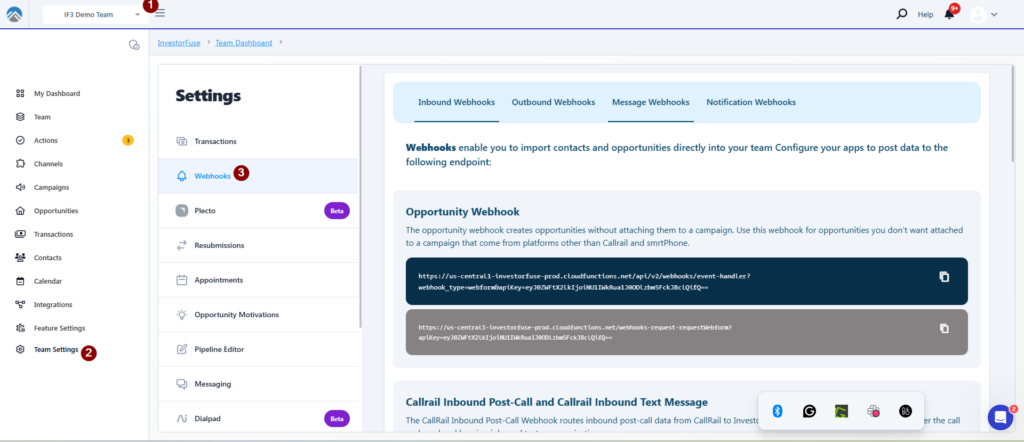
Inbound Webhooks / Callrail Webhooks
5. Inbound webhooks enable us to import your contacts and leads/opportunities and are configured by our Integrations Team at the time of setup. This is information you can copy if you need it, but it is read-only.
Outbound Webhooks
6. This is webhook information you can add to post to other applications about your Opportunities inside Carrot CRM.
Completed Action Outbound Webhook
This triggers every time an Action is completed in Carrot CRM. It instantly sends information to the webhook URL you set.
This will also trigger the Opportunity Status Change Webhook.
Blank fields from the Opportunity will not be posted.
Opportunity Status Change Outbound Webhook
This triggers when you update the status of an Opportunity anywhere in Carrot CRM. It instantly sends information to the webhook URL you set.
This is triggered alongside Completed Actions. Blank fields from the Opportunity will not be posted.
Opportunity Created Outbound Webhook
This is triggered when an Opportunity is created — manually or through an integration — regardless of the source. It instantly sends information to the webhook URL you set.
Minimal fields are posted to the webhook URL: only the ones available upon manual or automatic creation of the Opportunity.
Was this article helpful?